AI RED TEAM

AI Red Team & Security Research Workspace

Pentest and investigate code and live applications, test security hypotheses, and document findings with AI.

Find vulnerabilities. Prove their impact.

This endpoint might skip an authorization check… Start investigating →
One workspace for the work
{ }Source code ◎Live application ⇄Traffic ?Hypotheses ▣Evidence
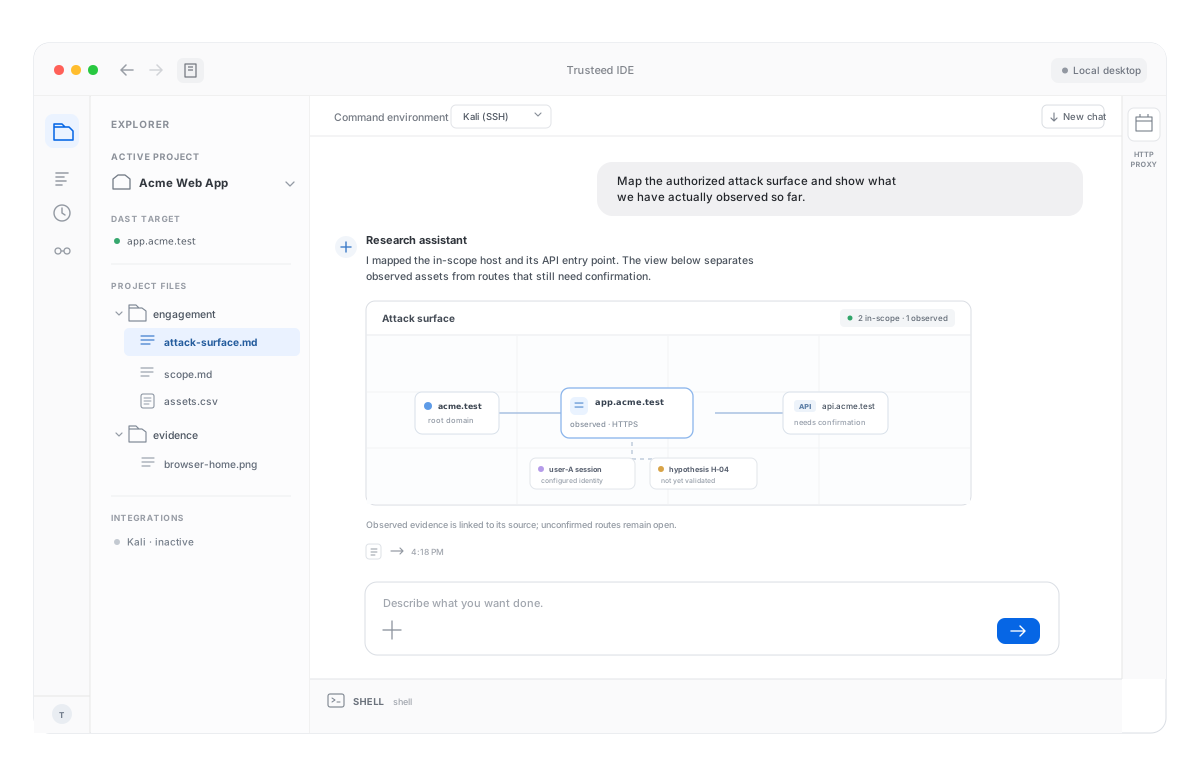
Trusteed IDE research workspace with an Explorer sidebar, security research chat, attack-surface view, and collapsed Shell and HTTP Proxy panels.
Researcher and AI in the same place TerminalProxySourceHypothesesEvidence
What you accomplish

Find vulnerabilities. Prove their impact.

A suspicion becomes a finding when the workspace can show the impact.

◎

Understand the attack surface

Decide what is worth investigating from the code, the running application, and the traffic. The workspace holds those three views together so the scope of the research is explicit.

✦

Investigate with AI

Form a hypothesis, run the tests, and read the results in the same thread. You stay in the loop: the AI proposes the next check, you see what came back.

▣

Build findings backed by evidence

Each finding keeps the reproduction steps and the proof of impact. A written suspicion stays a hypothesis until the responses, or the code, show what actually happened.

The investigation

One hypothesis. Two accounts. Proof attached.

The workspace is built for this loop: name the suspicion, run it against the live application, compare what came back, and file the finding with that evidence.

01

Name the hypothesis

“This endpoint might skip an authorization check.” The order id in the path is the thing to test.

02

Test with two accounts

Request the same order as the owner, then again as a second account that should not see it.

03

Compare the responses

Status codes and bodies sit side by side. A match is the impact: the second account read the first account’s order.

04

Attach the evidence

Both requests, both responses, and the diff become the finding. The write-up can be reproduced from the workspace.

THE WORKSPACE

Code, the live app, and the traffic in one place

Security research jumps between a repository, a running target, and the requests in between. Trusteed keeps the terminal, the proxy, the source, the hypotheses, and the evidence on one surface so the investigation does not fragment across tools.

SOURCE
orders.get(id)
// no account check
LIVE APPLICATION
GET /api/orders/1842
Authorized target · two test accounts
TRAFFIC
alice → 200
bob → 200 · same body
FINDING
F-1842
Broken access control. Evidence: two responses, one order.
Who it’s for

People who have to prove the bug

⌕

Security researchers

Follow a suspicion from code or traffic through a live check, and keep the notes next to the result.

{ }

Application security

Investigate an endpoint with the repository, the running app, and the proxy in the same workspace.

▣

Vulnerability validation

Turn a possible issue into a finding that shows reproduction steps and the impact on a real response.

Blog

Notes on AI Red Team & security research

View all posts →
CopyFail (CVE-2026-31431) and Dirty Frag (CVE-2026-43284 / CVE-2026-43500): The Linux Kernel LPE Chain Every SOC Needs to Know

CopyFail (CVE-2026-31431) gives root with a 732-byte script and no disk writes, invisible to disk-based FIM. A week later, Dirty Frag (CVE-2026-43284 / CVE-2026-43500) bypassed the CopyFail mitigation entirely by exploiting ESP and RxRPC instead of algif_aead. Both are actively exploited, both have public PoCs, and the standard modprobe blacklist does not work on RHEL-family distros.

Read MoreRead More

Find vulnerabilities.
Prove their impact.

The AI Red Team & Security Research Workspace. Start with a hypothesis on code or a live application, and leave with a finding that carries its evidence.